WhatsApp Business API vs WhatsApp Business App
Compare features, automation, team access, integrations, pricing and business use cases to choose the right WhatsApp solution for your business.
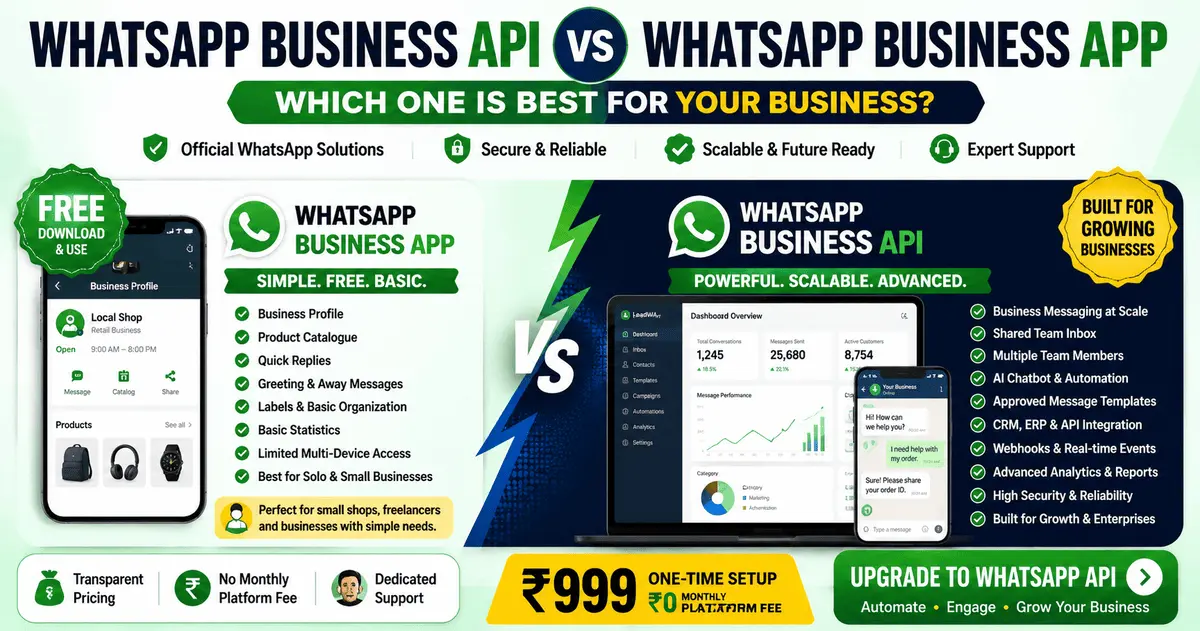
Table of Contents
1. Introduction
WhatsApp offers two primary business solutions: the WhatsApp Business App and the WhatsApp Business Platform (API). While both enable businesses to communicate with customers, they serve different purposes and business sizes.
The WhatsApp Business App is a free mobile application designed for small businesses with basic communication needs, while the WhatsApp Business Platform is an API-based business messaging solution designed for businesses that need scalable communication, automation, team workflows and integrations.
This comprehensive comparison will help you understand the differences and choose the right solution for your business needs.
Key Difference: The WhatsApp Business App is a free mobile application for small businesses, while the WhatsApp Business Platform is an API-based solution for businesses that need advanced features, team collaboration, automation and scalable customer communication.
2. What Is the WhatsApp Business App?
The WhatsApp Business App is a free mobile application designed for small businesses. It provides basic business communication features and is available for Android and iOS devices.
Key Features of WhatsApp Business App:
- Business Profile: Create a business profile with your company name, description, category, address, website and contact information
- Product Catalogue: Display products or services with images, prices and descriptions
- Automated Messages: Set up greeting messages and away messages
- Quick Replies: Create and save frequently used messages for faster responses
- Labels: Organise chats with custom labels for better management
- Statistics: View basic metrics like messages sent, delivered and read
- Limited Multi-Device Access: Connect multiple devices, but advanced team workflows require platform-based solutions
Best for: Small businesses, solopreneurs, freelancers and local shops with low message volume and simple communication needs.
3. What Is WhatsApp Business Platform?
The WhatsApp Business Platform (API) is an API-based business messaging solution designed for businesses that need scalable communication, automation, team workflows and integrations.
Key Features of WhatsApp Business Platform:
- REST API Access: Programmatic access for building custom solutions and integrations
- Webhooks: Real-time event notifications for messages, status updates and customer interactions
- Team Collaboration: Shared team inbox with multiple user access and conversation assignment
- Approved Message Templates: Pre-approved templates for utility, marketing and authentication messages
- Advanced Automation: AI chatbots, automated workflows and customer engagement flows
- CRM and ERP Integration: Connect with business systems for seamless customer data synchronisation
- Analytics and Reporting: Detailed insights on message performance, customer engagement and team productivity
- Scalable Communication: Handle high message volumes with business-grade infrastructure
Best for: Growing businesses, enterprises, ecommerce, education, healthcare, real estate and businesses that need team collaboration, automation and integrations.
4. WhatsApp Business App vs WhatsApp Business Platform — Quick Comparison
Here's a quick overview of the key differences between the two solutions:
| Feature | WhatsApp Business App | WhatsApp Business Platform |
|---|---|---|
| Best for | Small businesses | Growing businesses & enterprises |
| Business size | Small, solo entrepreneurs | Medium, large, enterprise |
| Mobile application | ✅ Yes (Android/iOS) | ✅ API-based; accessed through compatible dashboards, integrations or provider interfaces |
| Business profile | ✅ Basic | ✅ Advanced |
| Product catalogue | ✅ Yes | ✅ Available through supported commerce integrations and eligible configurations |
| Basic automated replies | ✅ Limited | ✅ Advanced |
| Business messaging at scale | ❌ Limited | ✅ Yes |
| Shared team inbox | ❌ Limited multi-device access | ✅ Shared team workflows, depending on provider and plan |
| Multiple team members | ❌ Limited linked-device access | ✅ Shared team workflows, depending on provider and plan |
| AI chatbot | ❌ No | ✅ Yes |
| Advanced automation | ❌ No | ✅ Yes |
| CRM integration | ❌ No | ✅ Yes |
| REST API access | ❌ No | ✅ Yes |
| Webhooks | ❌ No | ✅ Yes |
| Approved message templates | ❌ No | ✅ Yes |
| Analytics and reporting | ❌ Basic | ✅ Detailed |
| Custom business integrations | ❌ No | ✅ Yes |
| Technical onboarding | ❌ Not required | ✅ Guided onboarding |
Note: Features and capabilities may depend on the selected LeadWA plan, Meta requirements, account eligibility and technical implementation.
5. Detailed Feature Comparison
Let's explore each feature in detail to understand the differences:
📱 Mobile Application
WhatsApp Business App: Available as a mobile app for Android and iOS. You can manage your business communication from your smartphone.
WhatsApp Business Platform: API-based solution accessed through compatible dashboards, integrations or provider interfaces rather than a standalone mobile app. However, many providers offer mobile-friendly dashboards for managing conversations.
👤 Business Profile
WhatsApp Business App: Create a basic business profile with name, description, category, address, website and contact information.
WhatsApp Business Platform: Advanced business profile with additional verification options, display name approval and Meta business verification.
📦 Product Catalogue
WhatsApp Business App: Display products and services with images, prices and descriptions directly in the app.
WhatsApp Business Platform: Product catalogue capabilities available through supported commerce integrations and eligible configurations, often integrated with ecommerce platforms.
🤖 Automation and AI
WhatsApp Business App: Basic automated greeting and away messages only. No AI or advanced automation capabilities.
WhatsApp Business Platform: Advanced automation with AI chatbots, automated workflows, customer engagement flows and smart routing of conversations.
👥 Team Collaboration
WhatsApp Business App: Limited linked-device access, but advanced team assignment, shared-inbox workflows, roles and centralised collaboration generally require a platform-based solution.
WhatsApp Business Platform: Shared team inbox with support for multiple users, conversation assignment, team roles and collaboration features, depending on provider and plan.
🔗 Integrations
WhatsApp Business App: No API access. Cannot integrate with CRM, ERP or other business systems.
WhatsApp Business Platform: REST API, webhooks and integration capabilities for connecting with CRM, ERP, ecommerce platforms and custom business systems.
6. Automation and AI Chatbot Comparison
WhatsApp Business App:
- Greeting Message: Set an automatic greeting message when customers first contact you
- Away Message: Set an automatic response when you're unavailable
- Quick Replies: Save and reuse frequently sent messages
- No AI: No AI-powered chatbots or conversational AI
- Limited Automation: Manual responses except for basic automated messages
WhatsApp Business Platform:
- AI Chatbots: AI-powered chatbots for automated customer support, lead qualification and engagement
- Workflow Automation: Complex automated workflows with conditional logic and multi-step sequences
- Intent Recognition: AI understands customer intent and routes conversations appropriately
- Natural Language Processing: Advanced NLP for understanding customer messages
- Automated Follow-ups: Schedule and send automated follow-up messages
- Smart Routing: Route conversations to the right team members based on content or customer attributes
Key Difference: The WhatsApp Business App offers basic automated replies, while the WhatsApp Business Platform provides AI-powered chatbots, advanced automation workflows and intelligent conversation routing.
7. Multiple Users and Shared Team Inbox
WhatsApp Business App
- ✖ Limited multi-device access
- ✖ No advanced team collaboration
- ✖ No conversation assignment
- ✖ No shared inbox workflows
- ✖ No team roles or permissions
WhatsApp Business Platform
- ✓ Multiple team members supported
- ✓ Shared team inbox
- ✓ Conversation assignment
- ✓ Team roles and permissions
- ✓ Activity tracking and reporting
Key Difference: The WhatsApp Business App offers limited linked-device access, but advanced team assignment, shared-inbox workflows, roles and centralised collaboration generally require a platform-based solution. The WhatsApp Business Platform supports multiple team members with a shared inbox and team collaboration features, depending on the provider and plan.
8. CRM, API and Webhook Integration
WhatsApp Business App:
- No API Access: Cannot connect to CRM, ERP or other business systems
- No Webhooks: No real-time event notifications
- Manual Data Entry: Customer information must be managed manually
- Limited Integration: Can only share content within the app
WhatsApp Business Platform:
- REST API Access: Programmatic access for building custom solutions and integrations
- Webhooks: Real-time notifications for messages, status updates and customer interactions
- CRM Integration: Connect with popular CRM platforms like Salesforce, HubSpot, Zoho and more
- ERP Integration: Integrate with ERP systems for order management and customer data synchronisation
- Ecommerce Integration: Connect with Shopify, WooCommerce and other ecommerce platforms
- Custom Integrations: Build custom integrations using the API and webhooks
Key Difference: The WhatsApp Business App has no integration capabilities, while the WhatsApp Business Platform offers comprehensive API access, webhooks and integration options for connecting with business systems.
9. Message Templates and Customer Communication
WhatsApp Business App:
- Quick replies for frequently sent messages
- No approval process for messages
- Limited to direct customer conversations
- No bulk messaging capabilities
- No marketing message templates
WhatsApp Business Platform:
- Approved Message Templates: Pre-approved templates for utility, marketing and authentication messages
- Utility Messages: Order confirmations, payment notifications, shipping updates and appointment reminders
- Marketing Messages: Promotional content, offers and customer engagement messages (with appropriate customer consent)
- Authentication Messages: One-time passwords, verification codes and account authentication
- Bulk Messaging: Send messages to multiple customers using approved templates
- Template Review: Templates require review and approval before use
Key Difference: The WhatsApp Business App uses quick replies for manual responses, while the WhatsApp Business Platform uses approved message templates for structured outbound communication and scalable messaging.
10. Pricing and Cost Considerations
WhatsApp Business App
Free
No setup fee
No monthly fees
No message charges
Limited features
Single user focused
WhatsApp Business Platform
₹999
One-time setup fee
₹0 monthly platform fee
Message packs: Separate
Advanced features included
Multiple users supported
Message Usage
Pay as you go
Message packs available
Utility, marketing, authentication
Based on selected pack
Volume discounts available
Key Difference: The WhatsApp Business App is completely free, while the WhatsApp Business Platform involves a one-time setup fee (₹999) and separate message usage charges. However, the platform provides advanced features, team collaboration and integration capabilities that justify the investment for growing businesses.
11. Which Option Is Best for Small Businesses?
When the WhatsApp Business App Makes Sense:
- Very small businesses with 1-2 employees
- Low message volume (less than 100 messages per day)
- Solopreneurs and freelancers
- Local shops and neighbourhood businesses
- No need for advanced team collaboration
- No integration requirements
- Limited budget for business communication tools
- Simple communication needs (basic customer enquiries)
Recommendation: If you're a solopreneur or small business with low message volume and simple communication needs, the WhatsApp Business App is a good starting point. It's free and easy to use.
12. Which Option Is Best for Growing Businesses?
When the WhatsApp Business Platform Makes Sense:
- Growing businesses with 3+ team members
- High message volume (100+ messages per day)
- Multiple departments (sales, support, marketing)
- Need for team collaboration and shared inbox
- Require CRM or ERP integration
- Need automation and AI chatbots
- Marketing and promotional messaging with approval templates
- Scalable communication for growing customer base
- Ecommerce, education, healthcare, real estate and other service industries
Recommendation: If your business is growing and you need team collaboration, automation, integrations or scalable communication, the WhatsApp Business Platform is the right choice. It provides the advanced features needed for professional business communication.
13. When Should a Business Upgrade to the WhatsApp Business Platform?
Here are signs that it's time to upgrade from the WhatsApp Business App to the WhatsApp Business Platform:
Growing Team
You have multiple team members who need to manage customer conversations collaboratively. The app offers limited multi-device access without advanced team workflows.
Increasing Message Volume
You're receiving more customer messages than can be handled effectively. The platform provides scalable messaging infrastructure.
Integration Needs
You need to connect WhatsApp with your CRM, ERP, ecommerce platform or other business systems. The app doesn't provide API access.
Automation Requirements
You need AI chatbots, automated workflows or intelligent conversation routing. The app only offers basic automated replies.
Marketing Campaigns
You want to send promotional messages, offers and marketing content. The platform supports approved marketing message templates.
Analytics and Reporting
You need detailed insights on message performance, team productivity and customer engagement. The platform provides comprehensive analytics.
Key Takeaway: If you're experiencing any of these growth indicators, it's time to consider upgrading to the WhatsApp Business Platform. The investment in setup and message usage is justified by the advanced features and capabilities that support business growth.
14. WhatsApp Business Platform Setup with LeadWA
LeadWA provides a simple and guided setup process for the WhatsApp Business Platform in India:
- One-time Setup Fee: ₹999 (No monthly platform fees)
- Guided Onboarding: Step-by-step assistance through the entire setup process
- Phone Number Verification: Help with phone number selection and verification
- Business Profile Configuration: Assistance with business profile setup and display name configuration
- Meta Business Portfolio: Guidance on Meta Business Portfolio setup and management
- Message Template Creation: Support in creating and submitting message templates for approval
- Team Setup: Configure multiple users, roles and permissions
- Integration Support: Help with CRM, API, webhook and custom integrations
- Technical Support: Ongoing technical assistance for the platform
One-time platform setup only
No monthly platform subscription
Guided onboarding process
Technical setup assistance
15. Frequently Asked Questions
What is the difference between WhatsApp Business App and WhatsApp Business Platform?
The WhatsApp Business App is a free mobile application designed for small businesses with basic features, while the WhatsApp Business Platform is an API-based business messaging solution designed for businesses that need scalable communication, automation, team workflows and integrations.
Which is better for small businesses: WhatsApp Business App or API?
For very small businesses with low message volume, the WhatsApp Business App may be sufficient. However, as businesses grow and need team collaboration, automation, CRM integration and scalable communication, the WhatsApp Business Platform becomes the better choice.
Can I use both WhatsApp Business App and API?
Generally, a phone number can be registered with either the WhatsApp Business App or the WhatsApp Business Platform, but not both simultaneously. Migration between the two may be possible depending on current setup and Meta requirements.
Does WhatsApp Business App support multiple users?
The WhatsApp Business App offers limited linked-device access, but advanced team assignment, shared-inbox workflows, roles and centralised collaboration generally require a platform-based solution.
Can I automate messages with WhatsApp Business App?
The WhatsApp Business App offers limited automated greeting and away messages. The WhatsApp Business Platform supports advanced automation, AI chatbots, approved message-template workflows and sophisticated business communication flows.
Does WhatsApp Business App have API access?
No. The WhatsApp Business App does not provide API access. The WhatsApp Business Platform provides REST API access, webhooks and integration capabilities for connecting with CRM, ERP and custom business systems.
Can I send marketing messages with WhatsApp Business App?
The WhatsApp Business App is primarily for direct customer conversations. The WhatsApp Business Platform supports approved message-template workflows for marketing, utility and authentication messages with appropriate customer consent.
What are the pricing differences between WhatsApp Business App and API?
The WhatsApp Business App is free to use. The WhatsApp Business Platform involves a one-time setup fee through providers like LeadWA (₹999), plus message usage charges based on the selected message pack.
When should a business upgrade from WhatsApp Business App to API?
Businesses should consider upgrading to the WhatsApp Business Platform when they need team collaboration, automation, integration with CRM systems, message templates, scalable communication, or when the business is growing beyond what the app can handle.
How long does it take to set up WhatsApp Business Platform?
Setup time depends on the completeness of business information, phone-number eligibility, Meta review requirements, display-name review, template review and technical configuration. LeadWA provides guidance throughout the setup process.
What are the WhatsApp Business App limitations?
The WhatsApp Business App limitations include: limited multi-device support, no API access, limited team collaboration, basic automation only, no message templates, no integration capabilities, basic analytics and limited scalability for growing businesses.
Does WhatsApp Business Platform have a mobile app?
The WhatsApp Business Platform is API-based and accessed through compatible dashboards, integrations or provider interfaces rather than a standalone mobile app. However, many providers offer mobile-friendly dashboards for managing conversations.
Does LeadWA provide WhatsApp Business Platform setup?
Yes, LeadWA provides guided WhatsApp Business Platform setup for Indian businesses. This includes one-time setup, phone verification, business profile configuration, Meta Business Portfolio guidance, message template creation, team setup and integration support.
16. Final Recommendation
Choose the WhatsApp Business App if:
- You're a solopreneur, freelancer or very small business
- You have low message volume (under 100 messages per day)
- You don't need advanced team collaboration
- You don't require integrations with other business systems
- You're on a limited budget for business tools
Choose the WhatsApp Business Platform if:
- You have a growing business with 3+ team members
- You need team collaboration and shared inbox
- You require CRM, ERP or API integrations
- You need automation, AI chatbots or advanced workflows
- You want to send marketing messages with approved templates
- You need detailed analytics and reporting
- You want scalable communication for business growth
Key Takeaway: The WhatsApp Business App is a great starting point for very small businesses, but as your business grows, the WhatsApp Business Platform provides the advanced features, collaboration tools and scalability needed for professional customer communication.
Explore More LeadWA Resources
Learn more about WhatsApp Business solutions with these helpful resources:
WhatsApp Business API India
Explore WhatsApp Business Platform features, setup and business communication tools.
WhatsApp Cloud API India
Learn about Cloud API connectivity, webhooks and business integrations.
WhatsApp Business Platform Pricing
Review LeadWA setup pricing, message packs and available business solutions.
WhatsApp Marketing Software India
Manage customer campaigns, templates, audiences and communication workflows.
How to Get WhatsApp Business API in India
Complete step-by-step guide for Indian businesses to get WhatsApp Business API.
WhatsApp Business API Cost in India
Detailed breakdown of WhatsApp Business API pricing, setup costs and message charges.