WhatsApp Business API Integration: Complete Guide for Indian Businesses
Learn how WhatsApp Business API integration works with websites, CRM systems, ecommerce platforms, webhooks and automation. Explore setup, testing and best practices.
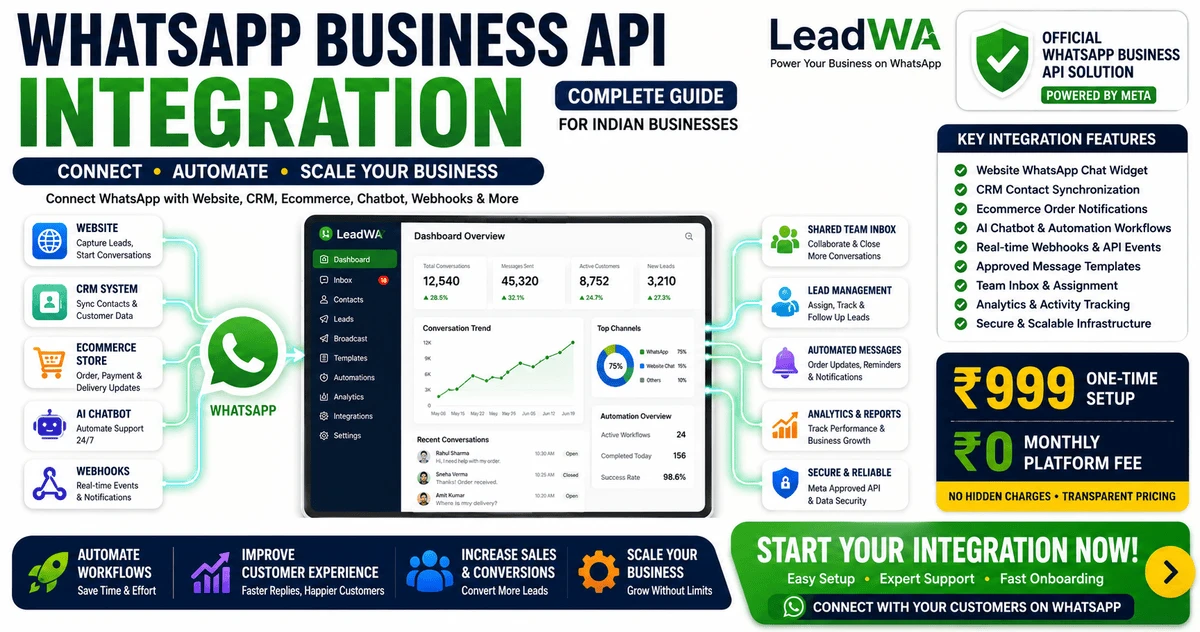
Table of Contents
1. Introduction
Businesses today use a variety of tools to manage customer communication, including websites, CRM systems, ecommerce platforms, support desks and marketing tools. Customer information often exists across these different systems, making it challenging to maintain a consistent and organised communication experience.
WhatsApp Business API India integration can help businesses connect these systems and create more organised customer communication workflows. By connecting WhatsApp with existing business tools, businesses can respond to enquiries more efficiently, automate routine tasks and maintain accurate customer records.
This guide explains how WhatsApp Business API integration works, covering integration architecture, website integration, CRM connectivity, ecommerce workflows, webhooks, automation, security, testing and implementation best practices.
In this guide, you will learn:
- Integration architecture and components
- Website integration approaches
- CRM and ecommerce connectivity
- Webhook configuration and events
- Chatbot and automation integration
- Security best practices
- Testing and troubleshooting
- Implementation planning
2. What Is WhatsApp Business API Integration?
WhatsApp Business API integration connects applicable WhatsApp business-messaging capabilities with websites, CRM platforms, ecommerce systems, support tools, automation workflows or custom applications.
Integration typically involves:
- API requests: Sending and receiving data through the WhatsApp API
- Webhook events: Receiving real-time notifications for customer interactions
- Customer messages: Managing communication across connected systems
- Business systems: Connecting WhatsApp with CRM, ecommerce and support tools
- Message templates: Using approved templates for structured communication
- Automation workflows: Triggering automated actions based on customer events
- Team communication tools: Enabling team collaboration on customer conversations
Available integration capabilities depend on the connected WhatsApp business account, platform configuration, selected provider or plan, business requirements, applicable WhatsApp requirements and third-party integration support.
3. How WhatsApp Business API Integration Works
WhatsApp API integration typically follows a structured workflow that connects customer interactions with business systems.
Simplified example workflow. Actual architecture depends on the connected systems and implementation.
The typical integration workflow follows these steps:
- Step 1: A customer interacts with a website, business system or WhatsApp number
- Step 2: The connected application sends or receives applicable information through an API or webhook workflow
- Step 3: The business platform processes the event
- Step 4: The workflow may update a CRM, trigger automation or route a conversation
- Step 5: An automated response or team-member action may occur
- Step 6: Available message-status events may be returned to the connected system
4. WhatsApp API Integration Architecture
Understanding the components of a WhatsApp API integration helps businesses plan their implementation effectively.
| Component | Purpose | Example Responsibility | Important Consideration |
|---|---|---|---|
| Customer Channel | Customer interaction point | Website, mobile app, WhatsApp | Channel availability depends on integration |
| WhatsApp Business Account | Connected WhatsApp business account | Message sending and receiving | Requires eligible phone number and Meta verification |
| API Connectivity | API request handling | Message delivery, status updates | Requires API credentials and secure connection |
| LeadWA Platform | Business communication dashboard | Team inbox, automation, templates | Provides user-friendly management interface |
| Webhook Endpoint | Event notification receiver | Incoming messages, status updates | Requires HTTPS and proper configuration |
| Business Application | Connected business system | CRM, ecommerce, support tools | Integration depends on API support |
| CRM or Database | Customer data storage | Contact records, conversation history | Data protection and privacy requirements apply |
| Automation Engine | Workflow automation | Triggers, rules, actions | Capabilities depend on selected plan |
| Team Inbox | Team collaboration | Conversation assignment, responses | Multiple team members can collaborate |
| Analytics and Logs | Monitoring and reporting | Message tracking, performance | Analytics capabilities vary by plan |
5. Requirements Before WhatsApp API Integration
Before starting a WhatsApp API integration, businesses should consider the following requirements:
Business Requirements
- Clear communication use case
- Accurate business information
- Customer communication plan
- Appropriate customer consent processes
- Team responsibilities and workflows
Technical Requirements
- Compatible business system
- Secure website or application
- HTTPS endpoint where required
- Webhook endpoint for event notifications
- Development or technical support resources
- Testing environment
- Error logging and monitoring
- Data-protection plan
WhatsApp-Related Requirements
- Applicable business onboarding
- Eligible phone number
- Connected WhatsApp business account
- Message-template setup where applicable
- Applicable verification or review requirements
Note: Requirements may vary according to account eligibility, business setup, selected integration and applicable WhatsApp requirements. Review current guidelines before starting integration.
6. WhatsApp API Integration with a Website
Website integration enables businesses to connect their website with WhatsApp communication workflows. Common use cases include:
- Website enquiry form to WhatsApp follow-up: Customer enquiries trigger WhatsApp workflows
- Contact form notification: Form submissions notify team members via WhatsApp
- Customer-support entry point: WhatsApp chat buttons on websites
- Appointment request: Booking enquiries routed to team members
- Booking enquiry: Service booking requests through WhatsApp
- Order-status request: Customers check order status via WhatsApp
- Lead capture: Website visitors can connect via WhatsApp
- Customer opt-in workflow: Consent collection for marketing communication
Common Integration Approaches
- WhatsApp entry-point link: Add a WhatsApp chat button to your website
- Website form connected to a business workflow: Form submissions trigger WhatsApp notifications
- Custom API-based application integration: Full integration between website and WhatsApp API
Sample Workflow
Privacy Note: Collect only information necessary for the intended business purpose and protect customer information appropriately. Ensure compliance with applicable data protection regulations.
7. WhatsApp API Integration with CRM
WhatsApp CRM software integration enables businesses to manage customer relationships more effectively. Key integration benefits include:
- Customer profile synchronisation: Keep customer data consistent across systems
- Conversation history: View WhatsApp conversations in the CRM
- Lead assignment: Assign leads to appropriate team members
- Lead status tracking: Track lead progress through sales pipelines
- Follow-up workflows: Automate follow-up tasks based on customer interactions
- Customer tags: Categorise customers for targeted communication
- Support records: Maintain complete support interaction history
- Sales-pipeline activity: Track deals and opportunities
CRM Integration Workflow
Note: Integration availability depends on the CRM platform, available APIs, webhook support and technical implementation. Not every CRM platform may support WhatsApp integration.
8. WhatsApp API Integration for Ecommerce
Ecommerce integration enables businesses to automate customer communication throughout the purchase journey. Common workflows include:
- Order confirmation: Send order confirmation messages
- Payment notification: Notify customers about payment status
- Order packed: Update customers when orders are packed
- Shipping update: Send shipping and tracking information
- Delivery update: Notify customers about delivery status
- Customer-support enquiry: Handle post-purchase support
- Product-information request: Answer product questions
- Customer-feedback request: Gather feedback after delivery
- Promotional communication: Share relevant offers with appropriate consent
Ecommerce Integration Workflow
Note: Message category, customer context, consent and applicable template requirements should be reviewed before implementation. Not every ecommerce platform may support WhatsApp integration.
9. WhatsApp Chatbot and Automation Integration
WhatsApp chatbot for business integration enables businesses to automate common customer interactions. Use cases include:
- Frequently asked questions: Automate responses to common questions
- Lead qualification: Ask qualifying questions to understand customer needs
- Customer routing: Route customers to the right team or department
- Business-hour messages: Inform customers about business hours
- Appointment workflows: Help customers book appointments
- Basic order-information workflows: Provide order status updates
- Human handoff: Transfer complex enquiries to team members
Note: AI chatbots can assist with common questions and structured workflows, while complex or sensitive enquiries may require review by a team member. Available chatbot capabilities depend on the selected LeadWA plan, configuration, connected systems and implementation requirements.
10. WhatsApp Webhook Integration
A webhook is a method through which one system can send event information to another configured endpoint. In the context of WhatsApp, webhooks enable real-time event notifications.
Possible Webhook Events
- Incoming message: Customer sends a message
- Message-status update: Message delivered or read
- Customer response: Customer replies to a message
- Template-status information: Template approval or rejection updates
- Conversation-routing event: Conversation assigned to team member
- Workflow trigger: Automation workflow initiated
Webhook Workflow
Educational Webhook Payload Example
Simplified educational example. Actual payload structures depend on the connected API, platform and implementation.
Security Note: Never expose real access tokens, customer phone numbers, account IDs or webhook secrets in public code repositories, screenshots or browser-side JavaScript.
11. Message Template Integration
WhatsApp Business API message templates are an important part of outbound communication workflows.
Template integration involves:
- Template creation: Creating templates for relevant communication purposes
- Category selection: Selecting utility, marketing or authentication categories
- Variable configuration: Setting up template variables for personalisation
- Template submission: Submitting templates for applicable review
- Status tracking: Monitoring template approval status
- Automation triggers: Using templates in automated workflows
Note: Approved message templates are generally used for applicable business-initiated communication according to the message category and customer-conversation context. Template approval is not guaranteed.
12. Customer Data and Workflow Design
Effective integration requires careful planning of customer data flow and workflow design. Consider these elements:
- Define the minimum required customer information
- Map data fields between connected systems
- Define the source of truth for customer data
- Avoid duplicate records
- Define workflow ownership and responsibilities
- Set customer-preference rules
- Define opt-out handling procedures
- Protect customer information appropriately
- Create data-retention rules
- Review access permissions
| Data Element | Possible Source | Business Purpose | Protection Consideration |
|---|---|---|---|
| Customer name | CRM, Website form | Personalised communication | Collect only necessary information |
| Contact identifier | CRM, Ecommerce | Message delivery | Store securely, access controls |
| Order ID | Ecommerce system | Order tracking | Limited to order-related workflows |
| Appointment date | Booking system | Appointment reminders | Relevant to appointment only |
| Support-ticket ID | Support system | Support follow-up | Limited to support workflows |
| Customer preference | CRM, Opt-in forms | Communication relevance | Respect customer preferences |
| Consent status | Opt-in records | Marketing communication | Maintain accurate consent records |
Legal Note: This information is for educational purposes only and does not constitute legal advice. Businesses should obtain professional legal, privacy or compliance guidance where necessary.
13. Security Best Practices
Protecting API credentials and customer data is essential for responsible WhatsApp API integration. Follow these security best practices:
- Use HTTPS: Ensure all connections are encrypted
- Protect API credentials: Store credentials securely, never in code repositories
- Do not expose access tokens in frontend code: Keep tokens server-side
- Store secrets securely: Use environment variables or secret management
- Validate webhook requests where supported: Verify request authenticity
- Use least-privilege access: Grant minimum necessary permissions
- Restrict admin permissions: Limit administrative access to authorised personnel
- Rotate credentials when appropriate: Periodically update access tokens
- Maintain logs: Keep activity logs for monitoring and troubleshooting
- Avoid logging unnecessary personal information: Protect customer privacy
- Keep software dependencies updated: Apply security patches promptly
- Test changes before production deployment: Validate in a safe environment
- Create backup and recovery procedures: Prepare for unexpected issues
Critical: Never publish access tokens, API secrets, private keys, webhook secrets or sensitive customer information in public code repositories, browser-side JavaScript or screenshots.
14. Testing and Deployment
Thorough testing helps ensure successful integration deployment.
Testing Checklist
- Verify account configuration
- Verify phone-number setup
- Test inbound messages
- Test applicable outbound templates
- Test variables and personalisation
- Test webhook delivery
- Test duplicate event handling
- Test error handling
- Test human handoff
- Test CRM updates
- Test customer opt-out workflow
- Test mobile and desktop dashboards
- Review logs for errors
- Verify access permissions
Deployment Stages
- Planning: Define requirements and architecture
- Development: Build and configure integration
- Test environment: Validate in isolated environment
- Limited internal testing: Test with small group
- Controlled launch: Gradual rollout to users
- Monitoring: Track performance and errors
- Ongoing improvement: Refine based on feedback
Tip: Always test integration changes in a development or staging environment before deploying to production. Implement gradual rollout when possible.
15. Common WhatsApp API Integration Problems
Understanding common integration issues helps businesses troubleshoot effectively.
| Problem | Possible Cause | What to Check |
|---|---|---|
| Webhook not receiving events | Incorrect endpoint configuration, SSL issues, authentication errors | Verify endpoint URL, HTTPS, credentials and permissions |
| Duplicate webhook events | Retry logic, multiple subscriptions | Implement idempotency and check subscription setup |
| Message not sent | Phone-number eligibility, template status, API error | Verify number, template approval status and API response |
| Template unavailable | Template not approved or expired | Check template approval status and validity |
| Incorrect template variable | Variable mismatch or missing data | Verify variable names and data source |
| CRM contact not updating | Integration configuration, API error | Check API credentials, mapping and response |
| Customer data duplicated | Multiple sources, deduplication missing | Review data sources and deduplication logic |
| Delayed workflow | Queue processing, system performance | Check logs and system performance metrics |
| Authentication error | Invalid credentials, expired token | Verify credentials and token validity |
| Permission error | Missing access rights | Review permission settings |
| Invalid phone-number configuration | Number not eligible or incorrectly set | Verify number eligibility and configuration |
| Media file not processed | Format or size issue | Check file format, size and supported types |
| Status update not recorded | Webhook not configured, status not sent | Check webhook configuration and event types |
| Chatbot not handing off correctly | Configuration error, routing logic | Review chatbot workflow and routing rules |
| Website form not triggering workflow | Integration configuration, form setup | Check form integration and workflow triggers |
Note: Exact troubleshooting steps depend on the API response, platform configuration, account status and connected application. Review logs for specific error details.
16. Integration Best Practices
Follow these best practices for successful WhatsApp API integration:
- Start with a clear business use case: Define specific goals and requirements
- Document the workflow: Map out the end-to-end workflow
- Use appropriate customer consent: Ensure consent for marketing communication
- Keep automation relevant: Automate tasks that add value
- Provide human handoff: Enable team member review when needed
- Use message templates appropriately: Follow category guidelines
- Validate customer data: Ensure data accuracy
- Protect API credentials: Follow security best practices
- Handle duplicate events: Implement idempotency
- Add retry logic carefully: Avoid infinite loops
- Maintain useful logs: Track activity for troubleshooting
- Avoid storing unnecessary personal data: Minimise data collection
- Test before broader launch: Validate in test environment
- Monitor workflow quality: Review performance regularly
- Review customer feedback: Improve based on feedback
- Keep integrations updated: Apply updates as needed
- Review current platform requirements: Stay informed about changes
17. WhatsApp API Integration Cost in India
WhatsApp Business API pricing includes several cost components:
Platform Setup
₹999
One-time fee
Standard onboarding included
Monthly Platform Subscription
₹0
No monthly fees
Zero platform subscription
Message Usage
Charged Separately
Based on selected pack
Utility, marketing, authentication
Additional Cost Considerations
- Applicable taxes: GST may apply
- Custom development: Integration with specific CRM or ecommerce platforms may involve additional development costs
- Third-party CRM or ecommerce fees: Connected third-party systems may have their own fees
- Technical maintenance: Ongoing technical maintenance may be required
- Custom integration requirements: Specific integration needs may involve additional costs
Note: The setup fee does not include unlimited message usage or every possible custom integration. Message-pack pricing, taxes, validity periods, usage conditions, third-party charges and custom-development costs may apply. Review the current LeadWA pricing page before purchase.
18. How LeadWA Can Help with WhatsApp API Integration
WhatsApp Cloud API integration with LeadWA provides businesses with a guided approach to WhatsApp API integration.
LeadWA may help businesses with:
- Guided onboarding: Step-by-step setup assistance
- WhatsApp Cloud API connectivity: Connect with Meta Cloud API
- Business communication dashboard: Manage conversations in one place
- Shared team workflows: Enable team collaboration on customer conversations
- Applicable message-template management: Create and organise templates
- Chatbot and automation configuration: Set up automation workflows
- CRM and webhook integration planning: Plan integration with business systems
- Website integration planning: Connect website with WhatsApp workflows
- Communication activity review: Track performance and engagement
- Technical setup assistance: Support during implementation
Note: Available capabilities depend on the selected LeadWA plan, connected systems, configuration, account eligibility and implementation requirements.
19. Frequently Asked Questions
What is WhatsApp Business API integration?
WhatsApp Business API integration connects applicable WhatsApp business-messaging capabilities with websites, CRM platforms, ecommerce systems, support tools, automation workflows or custom applications through API requests, webhook events and business-system connectivity.
How does WhatsApp API integration work?
WhatsApp API integration typically works through a connected platform like LeadWA that handles API connectivity, webhook events and business-system integration. When a customer interacts with a website, CRM or WhatsApp, the platform processes the event and may trigger automation, team notifications or system updates.
Can I integrate WhatsApp Business API with my website?
Yes, businesses can integrate WhatsApp Business API with their websites through entry-point links, website forms connected to business workflows, or custom API-based application integration. Integration capabilities depend on the website platform and technical implementation.
Can a website contact form connect with a WhatsApp workflow?
Yes, website contact forms can be connected to WhatsApp workflows through API integration. When a form is submitted, the information can be sent to the business platform, which may trigger a communication workflow, update a CRM or notify team members.
Can WhatsApp Business API integrate with a CRM?
Yes, the WhatsApp Business Platform supports CRM integration through REST APIs and webhooks. This allows businesses to synchronise customer data, manage leads and track conversations within their existing CRM systems. Integration availability depends on the CRM platform, API support and technical implementation.
Can WhatsApp API integrate with an ecommerce website?
Yes, WhatsApp API can integrate with ecommerce websites to support order confirmations, payment notifications, shipping updates, delivery confirmations, customer-support enquiries and promotional communication. Integration depends on the ecommerce platform and technical implementation.
Does WhatsApp API support chatbot integration?
Yes, the WhatsApp Business Platform supports chatbot integration for handling frequently asked questions, lead qualification, customer routing, business-hour messages, appointment workflows and structured customer communication. Chatbot capabilities depend on the selected plan and configuration.
What is a WhatsApp webhook?
A webhook is a method through which one system can send event information to another configured endpoint. In the context of WhatsApp, webhooks enable businesses to receive real-time notifications for incoming messages, message-status updates, customer responses and other relevant events.
What types of webhook events may be available?
Available webhook events may include incoming messages, message-status updates, customer responses, template-status information where available, conversation-routing events and workflow triggers. Exact events depend on the connected API, platform and configuration.
Do I need technical knowledge for WhatsApp API integration?
Platforms like LeadWA provide guided onboarding and integration assistance. However, custom integrations with specific CRM, ecommerce or custom applications may require technical knowledge depending on the complexity of the integration and the connected systems.
Do I need a Meta Business Portfolio?
Yes, a Meta Business Portfolio (formerly Facebook Business Manager) is generally required to use the official WhatsApp Business API. LeadWA provides guidance throughout the applicable setup process.
Can I use my existing WhatsApp number?
An eligible existing business number may be connected or migrated, depending on its current WhatsApp setup and Meta requirements. Contact your platform provider for migration guidance before starting the migration process.
Are message templates needed for WhatsApp API integration?
Approved message templates are generally used for applicable business-initiated communication according to the message category and customer-conversation context. Templates may be needed for outbound communication such as order confirmations, shipping updates and promotional messages.
How should API credentials be protected?
API credentials should be protected by using HTTPS, storing secrets securely, avoiding exposure in frontend code, using least-privilege access, rotating credentials when appropriate, and never publishing access tokens in public code repositories, browser-side JavaScript or screenshots.
How do I test a WhatsApp API integration?
Testing a WhatsApp API integration involves verifying account configuration and phone-number setup, testing inbound messages, testing applicable outbound templates with variables, testing webhook delivery, testing error handling, testing human handoff, testing CRM updates and reviewing logs before deployment.
Why is my webhook not receiving events?
Possible causes for webhook issues include incorrect endpoint configuration, SSL or HTTPS issues, authentication errors, network connectivity problems, missing permissions, duplicate events or platform configuration errors. Check the endpoint configuration, logs and applicable settings.
How much does WhatsApp API integration cost in India?
WhatsApp API integration cost includes a one-time platform setup fee of ₹999 with LeadWA, message usage charges based on the selected message pack, and custom integration costs that may vary according to scope, connected systems and technical requirements. Check the pricing page for current details.
Does LeadWA charge a monthly platform subscription?
No. LeadWA charges a one-time platform setup fee only. There are no recurring monthly fees. You pay once for platform access and then only for message usage based on your selected message pack.
Are custom integrations included in the ₹999 setup fee?
The one-time setup fee typically covers platform onboarding and standard connectivity. Custom integrations with specific CRM, ecommerce or business systems may involve additional costs depending on the scope and technical requirements.
How long does WhatsApp Business API integration take?
Integration timelines depend on business information completeness, phone-number eligibility, Meta review requirements, technical configuration, custom integration scope and applicable requirements. LeadWA provides guidance throughout the process.
Can LeadWA integrate with every CRM or ecommerce platform?
LeadWA supports integration with various CRM and ecommerce platforms through APIs and webhooks. Integration availability depends on the specific platform, API support, technical implementation and connected systems.
Does LeadWA guarantee Meta approval or Green Tick approval?
LeadWA provides guidance and setup assistance but does not guarantee Meta verification, display-name approval or Green Tick approval. Final decisions are made by Meta based on their eligibility criteria and business verification requirements.
20. Final Recommendation
WhatsApp Business API integration may be useful when a business needs:
- Organised customer communication: Centralised management of customer conversations
- Website-connected workflows: Integration with website enquiry forms and chat entry points
- CRM connectivity: Customer data synchronisation and lead management
- Ecommerce notifications: Order confirmations, shipping updates and payment notifications
- Chatbot assistance: Automated responses for common questions
- Team collaboration: Shared inbox for team communication
- Webhook-based automation: Real-time event notifications and workflow triggers
- Scalable business processes: Growing customer communication needs
The best integration approach depends on:
- Business requirements
- Existing systems
- Customer communication needs
- Technical resources
- Budget
- Security requirements
- Applicable platform requirements
Key Takeaway: WhatsApp Business API integration connects customer communication with business systems. With LeadWA's one-time setup and guided onboarding, businesses can plan integration according to their requirements and available technical resources.
Connect WhatsApp with Your Business Systems
Use LeadWA to plan customer communication workflows, connect compatible business tools and configure WhatsApp API integration according to your business requirements.
Explore More LeadWA Resources
Learn more about WhatsApp Business solutions with these helpful resources:
WhatsApp Business API Message Templates
Explore 50+ message template examples for utility, marketing and authentication.
How to Get WhatsApp Business API in India
Complete step-by-step guide for Indian businesses to get WhatsApp Business API.
WhatsApp Business API Cost in India
Detailed breakdown of WhatsApp Business API pricing, setup costs and message charges.
15 Benefits of WhatsApp Business API
Discover the key benefits of WhatsApp Business API for customer support, automation and team collaboration.